‘Big E.R.P.’ has become a straight-jacket for many big businesses whose business processes have changed significantly since implementation, but their software has not kept up. The result is, it compromises their flexibility and prevents a business from truly thriving. Hence the term 'straight-jacket'.
If you are a small business, you can learn from and take advantage of these restrictions on ‘Big Business’ by installing ‘Small E.R.P.’ that is flexible and expandable. Thereby, allowing your business to grow and truly thrive, while at the same time, the software expands and changes with you and does not act as a restraint on your activities. It is far easier to do this in a small business than in a large business.
To achieve this you must ignore the ‘Big E.R.P.’ systems and look for the ‘Small E.R.P.’ systems and suppliers. Your first task is to select a system whose 'software base' closely matches your current requirements. Having selected such systems out of the multitude available, you then need to ensure that the software supplier is able and willing to form a 'business partnership' with your business.
This 'business partnership' is essential in order that as you grow and your business processes change, they can change and grow the software in partnership with you.
If a supplier is only interested in selling you a system 'straight out of the box', move on and look for a software supplier that can truly support your business. It is the support that is the crucial element and is the part most often overlooked by small businesses.

Discusses views from the UK both cultural and political. With a distinct interest in software.
13 October 2016


10 May 2016
Scalable Vector Graphics - Simple Pie Charts
In addition to line and bar charts, most business will use pie charts in their management reports. This article explains how simple pie charts can be added to reports using the SVG HTML tag and the abilities of CSS transformations and animations.
In case you want to refer to a more detailed explanation of how to construct these pie charts and the CSS issues involved, please refer to Designing simple pie charts, the article that I used in putting together my own charts.
We start with a simple circle rendered via CSS. To do this we need the following HTML tag.
<div class="pie"></div>
And the CSS style commands of
.pie {
width: 100px; height: 100px;
border-radius: 50%; background: yellowgreen
}
Skipping a few steps that are explained in detail in the referenced article we end up using the "transform" and "animation" abilities of CSS with this HTML and CSS code:
<div class="pie" style="animation-delay: -25s"></div>
@keyframes spin {
to { transform: rotate(.5turn); }
}
@keyframes bg {
50% { background: #ff0000; }
}
.pie::before {
content: '';
display: block;
margin-left: 50%;
height: 100%;
border-radius: 0 100% 100% 0 / 50%;
background-color: inherit;
transform-origin: left;
animation: spin 3s linear infinite, bg 6s step-end infinite;
animation-play-state: paused;
animation-delay: inherit;
}
.pie {
width: 100px; height: 100px;
border-radius: 50%; background: yellowgreen
}
The style="animation-delay: -25s" addition to the DIV tag uses negative animation delays to step through to any point in the animation statically and stay there, in the words taken from the source article to which you are again referred. For our requirement, the 25 sets the percentage of the circle to hi-light. Building on this HTML and CSS it is easy to construct an interactive page to show numerous pie charts (here 4) based on entered figures and negative animation delays. With each amount converted to a percentage which is used to show the Pie Chart.
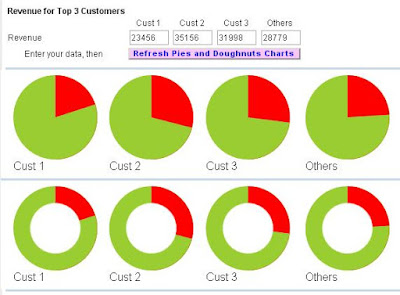
The above image shows each element of data in a separate pie chart, rather than combined in one pie chart as normally seen. This is a small draw back, but it would appear that for dynamic data usage, forming a single pie chart possess a lot of CSS problems. See reference article. So, although not perfect, dynamic Pie Charts can be used in management reports, just not in the traditional manner. This may not be such a big drawback as it allows the report designer to be inventive in the type and style of graphs used.
Finally, by adding a circle via CSS ::after code, with the background colour of the page, we can create a doughnut!
.pie::after {
content: '';
display: block;
margin-top: -96%;
margin-left: 20%;
height: 60%;
width: 60%;
border-radius: 50%;
background-color: #ffffff;
animation: spin 50s linear infinite;
}
So the only question left is - do you prefer PIES or DOUGHNUTS
In case you want to refer to a more detailed explanation of how to construct these pie charts and the CSS issues involved, please refer to Designing simple pie charts, the article that I used in putting together my own charts.
We start with a simple circle rendered via CSS. To do this we need the following HTML tag.
<div class="pie"></div>
And the CSS style commands of
.pie {
width: 100px; height: 100px;
border-radius: 50%; background: yellowgreen
}
Skipping a few steps that are explained in detail in the referenced article we end up using the "transform" and "animation" abilities of CSS with this HTML and CSS code:
<div class="pie" style="animation-delay: -25s"></div>
@keyframes spin {
to { transform: rotate(.5turn); }
}
@keyframes bg {
50% { background: #ff0000; }
}
.pie::before {
content: '';
display: block;
margin-left: 50%;
height: 100%;
border-radius: 0 100% 100% 0 / 50%;
background-color: inherit;
transform-origin: left;
animation: spin 3s linear infinite, bg 6s step-end infinite;
animation-play-state: paused;
animation-delay: inherit;
}
.pie {
width: 100px; height: 100px;
border-radius: 50%; background: yellowgreen
}
The style="animation-delay: -25s" addition to the DIV tag uses negative animation delays to step through to any point in the animation statically and stay there, in the words taken from the source article to which you are again referred. For our requirement, the 25 sets the percentage of the circle to hi-light. Building on this HTML and CSS it is easy to construct an interactive page to show numerous pie charts (here 4) based on entered figures and negative animation delays. With each amount converted to a percentage which is used to show the Pie Chart.

The above image shows each element of data in a separate pie chart, rather than combined in one pie chart as normally seen. This is a small draw back, but it would appear that for dynamic data usage, forming a single pie chart possess a lot of CSS problems. See reference article. So, although not perfect, dynamic Pie Charts can be used in management reports, just not in the traditional manner. This may not be such a big drawback as it allows the report designer to be inventive in the type and style of graphs used.
Finally, by adding a circle via CSS ::after code, with the background colour of the page, we can create a doughnut!
.pie::after {
content: '';
display: block;
margin-top: -96%;
margin-left: 20%;
height: 60%;
width: 60%;
border-radius: 50%;
background-color: #ffffff;
animation: spin 50s linear infinite;
}
So the only question left is - do you prefer PIES or DOUGHNUTS
22 April 2016
Scaleable Vector Graphics - SVG tags for graphic display of data extracted from accounting software!
With the increasing number of browsers, business applications need to allow users to use these browsers and still have graphic capabilities outside of the MS Office Web Component mentioned here in March 2011. The limitation of the OWC is that it can only be used under IE.
This limitation is lifted by the HTML "Scaleable Vector Graphics" tag SVG.
Using the SVG tag and its subordinate tags of G, LINE, POLYLINE, TEXT, etc. dynamic graphs can be produced under HTML reflecting data held within business and accounting software. Typically these graphs will be simple bar and line graphs, although more complex graphs can be constructed.
This limitation is lifted by the HTML "Scaleable Vector Graphics" tag SVG.
Using the SVG tag and its subordinate tags of G, LINE, POLYLINE, TEXT, etc. dynamic graphs can be produced under HTML reflecting data held within business and accounting software. Typically these graphs will be simple bar and line graphs, although more complex graphs can be constructed.
24 October 2015
Democracy suffers again to the joint Gods of the EU and Euro
With the left and far left being denied the forming of a coalition government by the president of Portugal, democracy takes a backseat to the GODS of the EU and the Euro.
It will be great to see what happens if and when GB votes to leave the EU in the up coming referendum. Will the GODS dare push back against the British will or will they reluctantly concede that their project is over.
I can't see them giving in without a big political fight that may just become physical. The so called political elite of Europe have already shown many times that they do not care what the people think, or vote (rather like the Labour party at the moment). The big project must continue despite the fact that people are beginning to express quite clearly that enough is enough.
It will be great to see what happens if and when GB votes to leave the EU in the up coming referendum. Will the GODS dare push back against the British will or will they reluctantly concede that their project is over.
I can't see them giving in without a big political fight that may just become physical. The so called political elite of Europe have already shown many times that they do not care what the people think, or vote (rather like the Labour party at the moment). The big project must continue despite the fact that people are beginning to express quite clearly that enough is enough.
11 April 2013
Multiple Clipboards?
One on the useful concepts that MS users use every day is the Copy (Ctl+C) Paste (Ctl+V) features. They are very useful for getting small snippets of data from one location - file/website/program/etc. to another. People who use them regularly, don't need to be told this.
However, I have often found having a single Clipboard area falls short when having to switch between 3 or 4 values. Like doing things on the internet with - User Ids, passwords, e-mail addresses, etc.
Up until now I have put the required text into tools like EditPadPro/Wordpad/etc. when switching frequently between values.
Doing HMRC file submissions over the last several days, has made me think about improving on this approach. Why not write a small VFP App to hold - lets say 9 different texts - that can be updated from or to the Clipboard with only a single mouse click.
Well that's what I've done see picture. First select a text value (turns yellow) then click the small arrows on the left shaded green to place the current contents into the chosen text field - thereby saving it. To place a text string into the Clipboard - select the value before clicking the red arrows on the right. Simple really. And I'm finding it very useful.

However, I have often found having a single Clipboard area falls short when having to switch between 3 or 4 values. Like doing things on the internet with - User Ids, passwords, e-mail addresses, etc.
Up until now I have put the required text into tools like EditPadPro/Wordpad/etc. when switching frequently between values.
Doing HMRC file submissions over the last several days, has made me think about improving on this approach. Why not write a small VFP App to hold - lets say 9 different texts - that can be updated from or to the Clipboard with only a single mouse click.
Well that's what I've done see picture. First select a text value (turns yellow) then click the small arrows on the left shaded green to place the current contents into the chosen text field - thereby saving it. To place a text string into the Clipboard - select the value before clicking the red arrows on the right. Simple really. And I'm finding it very useful.
26 March 2013
EuroZone democracy – is now dead
With Brussels seizing Cypriot cash savings in order to save
the euro, the final nail in democracy has now been hammered home.
The Cypriot parliament rejected the first lot of plans. Now
they are being defied with basically what amounts to out right theft of private
money. Not to save Cyprus, but all done to save the Euro.
Europe, the euro zone especially, are now ruled by a
political class that dreams of a supreme Europe and cares not a jot for
individual parliaments or the European people. It’s almost as if we lived under
the communist rule of Stalin or Mao!
We can see from this latest rape of the banks, that they
blindly believe that ALL money in Europe belongs to them, and not the
individual, be they corporate or otherwise.
By nature I am a conservative person, but will now welcome
the REVOLUTION when it comes. And it is coming – it’s just a matter of when.
11 April 2012
Cancer and computers
Watching the BBC Horizon program on cancer and modern treatments, what struck me the most was that these new innovations have come about due to the power and application of modern computers. In being able to:
a) display in 3D the molecular structure of specific parts of human DNA, and drugs;
b) design at a molecular level the structure of "new" drugs and to see their fit into defective DNA structures;
c) the ability to control large robotic machines in real time in order to assist a surgeon perform an operation or to deliver radiation to a highly specific target area.
Each application is no doubt very expensive to deliver in these early pioneer days, but will surely reduce in cost as they become more commonplace.
This modern computing power has been available for sometime, but in the past has mainly been applied to military and military style applications (like modelling nuclear explosions, designing fighter planes etc.). Or to government sponsored activities like weather forecasting, communication surveillance, etc.
Now with its application in medicine it should not be long before we all benefit from improved treatments an new drugs designed and developed in a much faster timescale than previously possible become available.
A brighter future is surely empowered by the digital world.
a) display in 3D the molecular structure of specific parts of human DNA, and drugs;
b) design at a molecular level the structure of "new" drugs and to see their fit into defective DNA structures;
c) the ability to control large robotic machines in real time in order to assist a surgeon perform an operation or to deliver radiation to a highly specific target area.
Each application is no doubt very expensive to deliver in these early pioneer days, but will surely reduce in cost as they become more commonplace.
This modern computing power has been available for sometime, but in the past has mainly been applied to military and military style applications (like modelling nuclear explosions, designing fighter planes etc.). Or to government sponsored activities like weather forecasting, communication surveillance, etc.
Now with its application in medicine it should not be long before we all benefit from improved treatments an new drugs designed and developed in a much faster timescale than previously possible become available.
A brighter future is surely empowered by the digital world.
17 February 2012
HTML code and MS Word
A useful feature that I only recently became aware of is that if you use the MS Word menu option Insert | File to import a file with a HTM/HTML file extension and it contains tagged data. MS Word renders the data in HTML format. It also does not have to have lead in Head and Body tags.
This facility can be used for outputing reports from a database application into a HTML file. Then the HTML can be inserted into MS Word for rendering and printing without having to use a browser. Plus, the data can be edited by the user - which is not possible when rendered by a browser.
This facility can be used for outputing reports from a database application into a HTML file. Then the HTML can be inserted into MS Word for rendering and printing without having to use a browser. Plus, the data can be edited by the user - which is not possible when rendered by a browser.
02 February 2012
Internet Telephony
When a PC is connected via broadband to the internet all day, a very cheap way of making telephone calls is via services like Skype. Not only can voice and video calls be made for free to fellow users. Skype even offers the facility to share the PC's screen, so that software problems, features, diagrams, etc. can be shared between the callers. All at no cost.
So for an SME with a large telephone bill, Internet Telephone is a way to significantly reduce those costs and improve the call experience with video and product demo's etc.
So for an SME with a large telephone bill, Internet Telephone is a way to significantly reduce those costs and improve the call experience with video and product demo's etc.
12 December 2011
Euro struggles on...
After all the rhetoric of the last few days - on all sides of the water - whether ocean or channel.
Does anyone believe that the Euro is any nearer to being rescued?
Thought not.
Democracy no longer seems important to Europe.
So what or whom does the election fixers/riggers in the rest of the world have to fear?
Sadly no one!!
So easy for them to turn around and point the finger at Europe - which can no longer be consider a democracy! Where everything is being impossed by non-elected technocrates.
Does anyone believe that the Euro is any nearer to being rescued?
Thought not.
Democracy no longer seems important to Europe.
So what or whom does the election fixers/riggers in the rest of the world have to fear?
Sadly no one!!
So easy for them to turn around and point the finger at Europe - which can no longer be consider a democracy! Where everything is being impossed by non-elected technocrates.
09 December 2011
What now for the Euro?
After yesterday’s summit in Brussels it is obvious that European politicians do NOT have an answer to the troubles of the Euro! Or, if they know the answer, it is not one that they are prepared to endorse. In my limited knowledge of currencies and the problems of the Euro, I believe its problems have to be addressed from 2 directions at the same time
1) impose austerity on the weak economies of the south
2) let the ECB print money to cause inflation and thereby reduce the value of the Euro in international markets
Neither one will work on its own. Both together and it stands a chance of saving the Euro. With this 2 directional approach both weak and strong countries take the pain. What we have at the moment is the imposition of the strong on the weak. With the weak taking all the punishment. (Merkels and Sarkozys attitude to Cameron, reminds one off the school bullies in the playground, not of astute politicians.) If this imbalance continues, then it is a slow drift to the inevitable break up of the Euro and ultimately the EU. For the markets will not relent in pursuing the weaknesses perceived in the Euro and its sovereign debt exposure.
As time ticks by, people in the weaker economies of Europe will become more and more restless and frustrated at the imposed austerity and lack of democracy. Military junta’s are not unknown in these countries. At some point a country will reach the tipping point when it will be less painful to leave the Euro than to remain in it. If the countries elected government doesn’t move at that point, I fear that a strong cabal of military leaders will take matters into their own hands.
When will the politicians of Germany and France ‘face the facts’ and do what everybody else can see and do what is bleeding obvious.
1) impose austerity on the weak economies of the south
2) let the ECB print money to cause inflation and thereby reduce the value of the Euro in international markets
Neither one will work on its own. Both together and it stands a chance of saving the Euro. With this 2 directional approach both weak and strong countries take the pain. What we have at the moment is the imposition of the strong on the weak. With the weak taking all the punishment. (Merkels and Sarkozys attitude to Cameron, reminds one off the school bullies in the playground, not of astute politicians.) If this imbalance continues, then it is a slow drift to the inevitable break up of the Euro and ultimately the EU. For the markets will not relent in pursuing the weaknesses perceived in the Euro and its sovereign debt exposure.
As time ticks by, people in the weaker economies of Europe will become more and more restless and frustrated at the imposed austerity and lack of democracy. Military junta’s are not unknown in these countries. At some point a country will reach the tipping point when it will be less painful to leave the Euro than to remain in it. If the countries elected government doesn’t move at that point, I fear that a strong cabal of military leaders will take matters into their own hands.
When will the politicians of Germany and France ‘face the facts’ and do what everybody else can see and do what is bleeding obvious.
08 December 2011
Demise of the Euro?
With the likelyhood of the breakup of the euro within the next months or even days. What will this mean for your business systems?
What will it mean for your business?
First we need to ascertain what the new currencies will be:
Northern Euro and Southern Euro?
Euro with New Greek drachma and New Italian Lira? May be even a Spainish and Portugese one thrown in.
Who can say at this stage!
What is certain is that new currency codes will be required at short notice along with conversations rates between the new currencies.
Will your business systems be able to cope?
When the Euro was introduced it was a slow process over several years. A breakup, should it come, will be without warning and will have to be accommodated in a few hours.
What you could be doing now - is
a) reducing your exposure to the Euro,
b) converting Euros bank balances into another currency,
c) invoicing in another currency in place of the euro,
d) trying to get suppliers to invoice in another currency,
e) investigating how to handle the new currencies and conversions of any assets and liabilites to new currencies.
Not all of this is possible as it will depend upon your customers and suppliers. Plus, exchange rates being what they are you can never be sure that a loss now want be much bigger if and when the "euro hits the fan"! Or, in fact become a profit due to market uncertainty being removed.
Therefore, I feel businesses need to be thinking about a strategy for all this uncertainty. Remember a risk managed, is far better than a risk ignored!
What will it mean for your business?
First we need to ascertain what the new currencies will be:
Northern Euro and Southern Euro?
Euro with New Greek drachma and New Italian Lira? May be even a Spainish and Portugese one thrown in.
Who can say at this stage!
What is certain is that new currency codes will be required at short notice along with conversations rates between the new currencies.
Will your business systems be able to cope?
When the Euro was introduced it was a slow process over several years. A breakup, should it come, will be without warning and will have to be accommodated in a few hours.
What you could be doing now - is
a) reducing your exposure to the Euro,
b) converting Euros bank balances into another currency,
c) invoicing in another currency in place of the euro,
d) trying to get suppliers to invoice in another currency,
e) investigating how to handle the new currencies and conversions of any assets and liabilites to new currencies.
Not all of this is possible as it will depend upon your customers and suppliers. Plus, exchange rates being what they are you can never be sure that a loss now want be much bigger if and when the "euro hits the fan"! Or, in fact become a profit due to market uncertainty being removed.
Therefore, I feel businesses need to be thinking about a strategy for all this uncertainty. Remember a risk managed, is far better than a risk ignored!
10 June 2011
HTML based Management reports
Most management reports are prepared using the ubiquitous spreadsheet. Primarily because accountants are familiar with the software and it gives flexibilty in layout and computation. Most software packages can download data to a spreadsheet or be SQL queried by them, so starting data for each month can be easily obtained. Then the commentary and insights by the various managers is added. The spreadsheet is then ready for distribution as is, or "printed" to a PDF file for distribution.
Few have considered HTML as a delivery vehicle. Yet for ease of use by a consuming manager it is possibly one of the best. As every PC and mobile device these days can read an HTML page. Not every PC or mobile device has the appropriate software to read a spreadsheet.
The problem with HTML is that "programming" knowledge is required to format a page or series of pages. Plus, how do you get the data into the HTML page?
Considering that the layout of most management reports does not change once established, putting a bit of effort into programming an HTML layout can be cost effective. Provided data can be drawn directly from the accounting and business management system. At RCL our accounting and business software packages provide this ability to draw data out of the system into an HTML document via SQL Select commands and a TableLookup function. What is more that data is not retricted to traditional accounting data; like Balance Sheet and P&L numbers; but can include any element held within the database. Possibles are: stock quantity levels, number of sales orders taken during a period, statistical departmental headcounts and vehicle numbers, even monthly management commentary can be entered, held and reported.
The HTML template document is itself held within the system. The SQL Selects and Table Lookups are evaluated prior to an HTML report being presented in an IE browser.
Having constructed an HTML management report template, the preparation of a "final" monthly report is just a question of awaiting for the monthly data to be complete and the management commentary being entered based upon "early drafts". The "early drafts" like the "final report" are just the HTML being "presented" in a browser. Being held on the system, these HTML reports are visible to all those given access. So "information control" by accountants holding "the cards close to their chests" becomes a thing of the past. As does the man hours consumed is preparing the reports.
Therefore management reports can become much more timely and relevant to the company. The approved final report when "presented" in a browser can be saved to a central server for all to subsequnetly access where ever they are in the world. Access to the underlying system not being required any more.
As my previous blog states, graphs can even be incorporated into a report to accommodate those "numerically challenged" managers that like pretty pictures!
Few have considered HTML as a delivery vehicle. Yet for ease of use by a consuming manager it is possibly one of the best. As every PC and mobile device these days can read an HTML page. Not every PC or mobile device has the appropriate software to read a spreadsheet.
The problem with HTML is that "programming" knowledge is required to format a page or series of pages. Plus, how do you get the data into the HTML page?
Considering that the layout of most management reports does not change once established, putting a bit of effort into programming an HTML layout can be cost effective. Provided data can be drawn directly from the accounting and business management system. At RCL our accounting and business software packages provide this ability to draw data out of the system into an HTML document via SQL Select commands and a TableLookup function. What is more that data is not retricted to traditional accounting data; like Balance Sheet and P&L numbers; but can include any element held within the database. Possibles are: stock quantity levels, number of sales orders taken during a period, statistical departmental headcounts and vehicle numbers, even monthly management commentary can be entered, held and reported.
The HTML template document is itself held within the system. The SQL Selects and Table Lookups are evaluated prior to an HTML report being presented in an IE browser.
Having constructed an HTML management report template, the preparation of a "final" monthly report is just a question of awaiting for the monthly data to be complete and the management commentary being entered based upon "early drafts". The "early drafts" like the "final report" are just the HTML being "presented" in a browser. Being held on the system, these HTML reports are visible to all those given access. So "information control" by accountants holding "the cards close to their chests" becomes a thing of the past. As does the man hours consumed is preparing the reports.
Therefore management reports can become much more timely and relevant to the company. The approved final report when "presented" in a browser can be saved to a central server for all to subsequnetly access where ever they are in the world. Access to the underlying system not being required any more.
As my previous blog states, graphs can even be incorporated into a report to accommodate those "numerically challenged" managers that like pretty pictures!
24 December 2010
Saving all your data?
Having just got through a forced and unplanned re-install of the Operating System on my PC, it brings home to me the importance of having good backups of ALL the data required to get a PC back into a workable condition.
Taking backups of application data for a company should be standard practise, but what about all the other marginal elements that a user relies upon - are they being saved in any format. Here are a few of the things I am thinking about:-
- e-mail accounts, passwords and log-on details to e-mail servers
- e-mail folder structures
- e-mail anti-spam rules
- the e-mails themselves within the application
- web browser Favourites, cookies and passwords
- options and preferences for applications that don't hold databases etc.
- application installs taken from the web
- upgrades and new releases to applications
- registry entries
- file and folder listings
- etc.
Applications like Outlook, IE and RegEdit have built in Export/Import menu options to save/re-establish settings and user configurations. I strongly suggest that you start using them (if not already doing so) and putting the resulting exported files into a location that is backed up and archieved off of the PC.
When installing a new application or an upgrade, don't run the program from the web but save the file to a suitable folder (C:\Downloads\AppName) and include this folder is your backup/archieve.
Luckily I have been doing this, so recover went well - even so it took 2 days. The only problem I encountered was that I rely on a bit of software that MS no longer supports, thus one of the first upgrades/patches was no longer available from its website. Had to use Google to locate another source before being able to continue. Now I have added it to my backup data.
One of the things that helped the most during the recovery was a list of folders and their files. This I had started creating on a regular basis; for entirely different reasons; a couple of months back using VBScript and the File System Object. The list help me identify missing applications, folders, files and versions.
I strong recommend ensuring that if you encounter a major disk/PC problem you have the necessary information and backups to help recover from it with as little hasle as possible.
Remember, PCs are cheap when compared to the cost of re-establishing all the data they hold!
Taking backups of application data for a company should be standard practise, but what about all the other marginal elements that a user relies upon - are they being saved in any format. Here are a few of the things I am thinking about:-
- e-mail accounts, passwords and log-on details to e-mail servers
- e-mail folder structures
- e-mail anti-spam rules
- the e-mails themselves within the application
- web browser Favourites, cookies and passwords
- options and preferences for applications that don't hold databases etc.
- application installs taken from the web
- upgrades and new releases to applications
- registry entries
- file and folder listings
- etc.
Applications like Outlook, IE and RegEdit have built in Export/Import menu options to save/re-establish settings and user configurations. I strongly suggest that you start using them (if not already doing so) and putting the resulting exported files into a location that is backed up and archieved off of the PC.
When installing a new application or an upgrade, don't run the program from the web but save the file to a suitable folder (C:\Downloads\AppName) and include this folder is your backup/archieve.
Luckily I have been doing this, so recover went well - even so it took 2 days. The only problem I encountered was that I rely on a bit of software that MS no longer supports, thus one of the first upgrades/patches was no longer available from its website. Had to use Google to locate another source before being able to continue. Now I have added it to my backup data.
One of the things that helped the most during the recovery was a list of folders and their files. This I had started creating on a regular basis; for entirely different reasons; a couple of months back using VBScript and the File System Object. The list help me identify missing applications, folders, files and versions.
I strong recommend ensuring that if you encounter a major disk/PC problem you have the necessary information and backups to help recover from it with as little hasle as possible.
Remember, PCs are cheap when compared to the cost of re-establishing all the data they hold!
25 June 2010
Flexible systems
With yet another change in VAT Rate looming at the end of the year, the importance of using a flexible accounting/ERP system that allows for the creation of new VAT codes, rates, etc. is brought to the fore.
Many 'older' systems provide little support in making such changes and allowing 'old rate' invoices and be processed at the same time as 'new rate' invoices. With the consequence that considerable effort is required around the time of actual rate change. Invoices being either to customers or from suppliers.
At least this time around many firms will have faced the problem in recent times and should be able to cope without major costs/holdups.
Inflexible systems are those that have codes and rates 'hard coded' into the program so that version upgrades are needed to meet new requirements. Where as flexible systems allow users to create and maintain entries to control it. This not only concerns tax rates, it covers all aspects of program control.
Of course with more sophisticated systems, the day to day requirements placed upon users is increased, as they need to understand more about the system and the interaction between various settings. However, this drawback is more than compensated for by the ease of changing the system when required.
My recommendation is to always look for and install the most flexible system you can find. That way you can be independent of the software supplier and still be comfortable in being able to meet the requirements of changing legislation and the overall business environment.
Many 'older' systems provide little support in making such changes and allowing 'old rate' invoices and be processed at the same time as 'new rate' invoices. With the consequence that considerable effort is required around the time of actual rate change. Invoices being either to customers or from suppliers.
At least this time around many firms will have faced the problem in recent times and should be able to cope without major costs/holdups.
Inflexible systems are those that have codes and rates 'hard coded' into the program so that version upgrades are needed to meet new requirements. Where as flexible systems allow users to create and maintain entries to control it. This not only concerns tax rates, it covers all aspects of program control.
Of course with more sophisticated systems, the day to day requirements placed upon users is increased, as they need to understand more about the system and the interaction between various settings. However, this drawback is more than compensated for by the ease of changing the system when required.
My recommendation is to always look for and install the most flexible system you can find. That way you can be independent of the software supplier and still be comfortable in being able to meet the requirements of changing legislation and the overall business environment.
03 February 2010
Planning for not being here! Death in other words
A recent family loss has suddenly brought home to me that very few of us effectively plan for not being here!
Lets assume you are an average Joe - with a partner and 2.n kids, may be a parent is still alive.
Now suddenly you are gone! You've died.
Your family are in a state of shock, bewilderment and bereaved.
Hopefully you have left a will.
But that is only a start.
Your bank accounts and credit cards are frozen.
Pension receipts will be stopped! So in the near term, money will be short.
Cars are not legally useable - in the short term - as they are in your name along with the insurance - which has now become invalid.
Yet, at the same time large funeral bills need to be incurred. Along with lots of letters to be written to organisations that they've never had to deal with before.
Do they know or know how to get to - passwords, account numbers, pin numbers, memorable words, mail and email addresses, telephone numbers, etc.
Who to contact for pensions, life insurance, mortgages, investments, ISA's, PEP's, etc.
Do they have access to joint accounts and their details?
Things that up to now you have always looked after.
Stop and think for a minute of all the things to be done at such a time.
It does not take long to come up with a long list.
How can you plan for this? In in order to reduce its impact on your family.
Start with a basic list of bank account details - codes, numbers, addresses.
During the year, add investments and pension details, as dividends are received or premiums paid out.
Give directions/details of the normal physical locations of items like keys, statements, policies, deeds, certificates. Include every day things as well as those deeds you put in the bottom of the box 25 years ago and have not been opened since!
All this sounds fairly easy to do - and it is when done in advance - BY YOU!
If you have complex affairs - investments, mortgages, share holdings, trusts etc., give a brief description of how it all hangs together and inter-relates and why you have structured it the way it is. You may have saved thousands in a complex structure. But all the savings could be eliminated by high legal fees trying to sort out and understand the situation you have created.
In to-days world the best place to create and hold this information is on a computer with Word, Excel or similar. Yet will your family know which file and directory path to access to get to all this information. So store a printed copy in a location that all family members know about.
As accounts are closed or become redundant, don't remove them from the list but note them as closed/redundant and give the date. Remember, Inheritance tax can go back 7 years.
Still think your family could handle the situation that your sudden departure has created? It may not be nice to thing of dieing, but do you really want to leave a lot of problems for your loved ones?
Start building that list and if you have spare funds put some in joint/single bank accounts that your partner/loved ones can get to when you have gone in order to tide them through those first weeks.
Lets assume you are an average Joe - with a partner and 2.n kids, may be a parent is still alive.
Now suddenly you are gone! You've died.
Your family are in a state of shock, bewilderment and bereaved.
Hopefully you have left a will.
But that is only a start.
Your bank accounts and credit cards are frozen.
Pension receipts will be stopped! So in the near term, money will be short.
Cars are not legally useable - in the short term - as they are in your name along with the insurance - which has now become invalid.
Yet, at the same time large funeral bills need to be incurred. Along with lots of letters to be written to organisations that they've never had to deal with before.
Do they know or know how to get to - passwords, account numbers, pin numbers, memorable words, mail and email addresses, telephone numbers, etc.
Who to contact for pensions, life insurance, mortgages, investments, ISA's, PEP's, etc.
Do they have access to joint accounts and their details?
Things that up to now you have always looked after.
Stop and think for a minute of all the things to be done at such a time.
It does not take long to come up with a long list.
How can you plan for this? In in order to reduce its impact on your family.
Start with a basic list of bank account details - codes, numbers, addresses.
During the year, add investments and pension details, as dividends are received or premiums paid out.
Give directions/details of the normal physical locations of items like keys, statements, policies, deeds, certificates. Include every day things as well as those deeds you put in the bottom of the box 25 years ago and have not been opened since!
All this sounds fairly easy to do - and it is when done in advance - BY YOU!
If you have complex affairs - investments, mortgages, share holdings, trusts etc., give a brief description of how it all hangs together and inter-relates and why you have structured it the way it is. You may have saved thousands in a complex structure. But all the savings could be eliminated by high legal fees trying to sort out and understand the situation you have created.
In to-days world the best place to create and hold this information is on a computer with Word, Excel or similar. Yet will your family know which file and directory path to access to get to all this information. So store a printed copy in a location that all family members know about.
As accounts are closed or become redundant, don't remove them from the list but note them as closed/redundant and give the date. Remember, Inheritance tax can go back 7 years.
Still think your family could handle the situation that your sudden departure has created? It may not be nice to thing of dieing, but do you really want to leave a lot of problems for your loved ones?
Start building that list and if you have spare funds put some in joint/single bank accounts that your partner/loved ones can get to when you have gone in order to tide them through those first weeks.
22 December 2008
Are you backing up your data?
Had a scare this week.
Computer failed to boot – screen completely blank!
Feared that the hard drive had got screwed up.
Looked at the option of doing a data recovery from the drive and installing a new hard drive in the machine. Staggered at the current prices – any thing from £450+
Immediately saw that data – or getting it back is more costly than a basic PC.
Eventually got the PC to boot and immediately took a backup of all my data.
Used the CD Read/Writer to create a couple of CD’s – always kept putting it off before. Now I shall do it at least once a month -New Years resolution.
At 75p a disk – that’s much cheaper than £450.
Computer failed to boot – screen completely blank!
Feared that the hard drive had got screwed up.
Looked at the option of doing a data recovery from the drive and installing a new hard drive in the machine. Staggered at the current prices – any thing from £450+
Immediately saw that data – or getting it back is more costly than a basic PC.
Eventually got the PC to boot and immediately took a backup of all my data.
Used the CD Read/Writer to create a couple of CD’s – always kept putting it off before. Now I shall do it at least once a month -New Years resolution.
At 75p a disk – that’s much cheaper than £450.
Using VOIP
Still using a standard telephone whilst sitting at your computer?
One of my kids started at Uni. recently and in the Halls of Residence they have internet access and a Freewire telephone.
Freewire is basically a VOIP telephone service that allows calls to be made over the internet free of charge. We've made calls lasting over an hour at absolutely NO cost.
So if you have remote workers or clients/contacts that you call daily, look to installing VOIP at both ends and use you PC's and internet connection to reduce your phone bill.
We have found the sound and transmission quality to be just like a normal phone. No delay and not voice distortion.
So give it a go - what have you got to lose - only a phone bill!
One of my kids started at Uni. recently and in the Halls of Residence they have internet access and a Freewire telephone.
Freewire is basically a VOIP telephone service that allows calls to be made over the internet free of charge. We've made calls lasting over an hour at absolutely NO cost.
So if you have remote workers or clients/contacts that you call daily, look to installing VOIP at both ends and use you PC's and internet connection to reduce your phone bill.
We have found the sound and transmission quality to be just like a normal phone. No delay and not voice distortion.
So give it a go - what have you got to lose - only a phone bill!
31 January 2008
SaaS - Software as a Service
Recently I was introduced by someone to the term SaaS or Software as a Service. It was presented as a "revolution" in the means of providing software to SME's.
Being the eternal cynic my views are
- Yes it is a new term;
- No it is not a new idea!
SaaS is basically the 1980's concept of timesharing provided by the likes of GEASCO (or was it GSISCO) during the late 70's and early 80's, but revamped to use the internet/web. The web replacing the dedicated BT telephone lines that timesharing used. Which is why in the 70's/80's it was a preserve of larger organisations who could carry the cost of the dedicated lines. With the advent of cheaper mainframes. midi's and PC's from the late 80's onwards, timesharing faded away.
Yes SaaS does allow software to be used without the headache of maintaining a system/server and it can be an economic means of using such software. But there are hidden dangers to this approach. Dangers that are very rarely addressed by the salesperson for the SaaS provider and often ignored or overlooked by the company using the SaaS system.
These dangers can be highlighted by answering the following questions:
- what happens if you loose internet connection for an extended period of time?
- what happens if the SaaS is continually attacked by a Denial of Service?
- what happens if the SaaS provider goes belly up?
- what happens if a rogue/disgruntled employee has a whole night to corrupt your data before you can contact the SaaS provider and get them barred?
The answer is simple - you cannot get to or rely on your company data!
How will this effect your company?
For most companies it would be a disaster that could at the extreme force you to go under.
Are such extended periods without access to your data likely?
Well the IT news of to-day is about the internet lines to India and the Middle East being severally disrupted due to a broken cable carrying internet traffic between Europe and Asia.
This is the crux of the problem - such downtimes/disasters cannot be forecast.
It reminds me of a situation that occured at a company I worked for in the mid 80's. It was moving from timeshare to an in-house system, with the new mainframe servers being based in the north of England some 200 miles away. Everything was set up, tested and ready for the switch over. On the morning of the switchover after a couple of hours of being live, a builder in a JCB outside the new server building decided to dig a trench and went right through the comms. cables ripping them out of the ground. It took 2/3 weeks to re-instate the cables delaying the switchover by a month. Luckily for the company it could immediately switch back to the timeshare provider to allow its business to continue. If this builder has done his trick several weeks later the switch back would not have been an option and the company would have suffered untold damage to its reputation and business.
Of course, this is why Disaster Recovery Plans are so important, no matter what size of company you are, having a Disaster Recovery Plan is essential.
Do you as a SaaS user have a Disaster Recovery Plan for your data stored at the SaaS provider? Plans and data that are independent of those provided by the SaaS provider.
With your own PCs/server it is relatively easy to backup and store company data off-site on an regular basis. It is all under you direct physical control. Getting to it or barring access to it is relatively easy.
Does the SaaS allow you to do this for ALL your data?
Not its own backups, but your backups that you can get to independently of the SaaS provider.
And having got the data, how easy will it be to get access to underlying applications in an emergency with little or no notice!
The cost of having to carry out these recovery plans will be fairly high but it will keep you in business. Without your data you will be severely hampered in keeping the business going.
When things are going well, it is easy to forget the problems that can be caused by the loss of a simple object like a telephone line.
My overall view is that many companies are attracted to SaaS because it saves time, money and having to deal with mundane things like data recovery plans. The very things that when the 'sh.. hits the fans' you will need in bucket fulls.
SaaS is fine when it works, but can be a real disaster when it does not!
For me SaaS is a disaster waiting to happen because it gives a false sense of security to the user company. Just because you use SaaS does not mean that you do not need an independent Disaster Recovery Plan for your company data.
How many SME's that currently use SaaS have Disaster Recovery Plans for the data held at the SaaS?
Was SaaS not supposed to remove the need for such things?
Well yes, but as you can see you can't!
Being the eternal cynic my views are
- Yes it is a new term;
- No it is not a new idea!
SaaS is basically the 1980's concept of timesharing provided by the likes of GEASCO (or was it GSISCO) during the late 70's and early 80's, but revamped to use the internet/web. The web replacing the dedicated BT telephone lines that timesharing used. Which is why in the 70's/80's it was a preserve of larger organisations who could carry the cost of the dedicated lines. With the advent of cheaper mainframes. midi's and PC's from the late 80's onwards, timesharing faded away.
Yes SaaS does allow software to be used without the headache of maintaining a system/server and it can be an economic means of using such software. But there are hidden dangers to this approach. Dangers that are very rarely addressed by the salesperson for the SaaS provider and often ignored or overlooked by the company using the SaaS system.
These dangers can be highlighted by answering the following questions:
- what happens if you loose internet connection for an extended period of time?
- what happens if the SaaS is continually attacked by a Denial of Service?
- what happens if the SaaS provider goes belly up?
- what happens if a rogue/disgruntled employee has a whole night to corrupt your data before you can contact the SaaS provider and get them barred?
The answer is simple - you cannot get to or rely on your company data!
How will this effect your company?
For most companies it would be a disaster that could at the extreme force you to go under.
Are such extended periods without access to your data likely?
Well the IT news of to-day is about the internet lines to India and the Middle East being severally disrupted due to a broken cable carrying internet traffic between Europe and Asia.
This is the crux of the problem - such downtimes/disasters cannot be forecast.
It reminds me of a situation that occured at a company I worked for in the mid 80's. It was moving from timeshare to an in-house system, with the new mainframe servers being based in the north of England some 200 miles away. Everything was set up, tested and ready for the switch over. On the morning of the switchover after a couple of hours of being live, a builder in a JCB outside the new server building decided to dig a trench and went right through the comms. cables ripping them out of the ground. It took 2/3 weeks to re-instate the cables delaying the switchover by a month. Luckily for the company it could immediately switch back to the timeshare provider to allow its business to continue. If this builder has done his trick several weeks later the switch back would not have been an option and the company would have suffered untold damage to its reputation and business.
Of course, this is why Disaster Recovery Plans are so important, no matter what size of company you are, having a Disaster Recovery Plan is essential.
Do you as a SaaS user have a Disaster Recovery Plan for your data stored at the SaaS provider? Plans and data that are independent of those provided by the SaaS provider.
With your own PCs/server it is relatively easy to backup and store company data off-site on an regular basis. It is all under you direct physical control. Getting to it or barring access to it is relatively easy.
Does the SaaS allow you to do this for ALL your data?
Not its own backups, but your backups that you can get to independently of the SaaS provider.
And having got the data, how easy will it be to get access to underlying applications in an emergency with little or no notice!
The cost of having to carry out these recovery plans will be fairly high but it will keep you in business. Without your data you will be severely hampered in keeping the business going.
When things are going well, it is easy to forget the problems that can be caused by the loss of a simple object like a telephone line.
My overall view is that many companies are attracted to SaaS because it saves time, money and having to deal with mundane things like data recovery plans. The very things that when the 'sh.. hits the fans' you will need in bucket fulls.
SaaS is fine when it works, but can be a real disaster when it does not!
For me SaaS is a disaster waiting to happen because it gives a false sense of security to the user company. Just because you use SaaS does not mean that you do not need an independent Disaster Recovery Plan for your company data.
How many SME's that currently use SaaS have Disaster Recovery Plans for the data held at the SaaS?
Was SaaS not supposed to remove the need for such things?
Well yes, but as you can see you can't!
06 May 2007
Small Print Runs for SME’s
A common problem faced by many small companies is to economically produce small quantities of high quality printed material. Here, I mean a quantity of less than 50 with over 16 pages – it could be a technical brochure, training manual, user guide, personnel policies manual, staff manual, etc.
The colour InkJet/Laser printer has helped considerably in achieving this objective. But problems still remain, with the time it takes to physically stack and bind the material in a professional manner and not just putting it into a ring binder of some sort.
Printers normally charge uneconomic prices for doing such work, especially if you are an infrequent customer.
Now a second unrelated problem. It is said ‘everybody has a book in them’. This may be true, but how do you get it published, printed and distributed?
Well in this age of the internet, it has an answer to this last problem – welcome to the age of Personal Publishing websites like www.lulu.com and www.bobsbooks.co.uk (just 2 of the many sites). They will print your book for you, put it on a list of titles and when someone orders will send the printed book to them and what is more you can earn income from it. All very good for all those budding authors.
And here is the answer to our first problem, of how small companies can get professionally printed and bound books at an economic price.
Create an account on your favourite Personal Publishing website, prepare your material and get it into PDF format (that is easy now with free readily available PDF software printers). Then create a project and upload the PDF file and the necessary information, before ordering your copies. No need to worry about distributing it or getting a price mark-up, you will be the only person ordering it.
This method can also help reduce costs, as you only need to order the number of copies you have an immediate requirement for. So in a stroke removing the problem of what to do with out of date printed manuals.
Due to the flexibility of this approach you can easily keep the manual up to date and order the odd copy as and when required.
Is it economic, well compared to the costs of buying top quality paper, ink cartridges/toner, etc. I have found that PP websites come out slightly more expensive. Now add in the cost of labour for time spent minding the printer and binding the material together, then the cost of the PP websites is economic and the finished article quality is much higher.
Two problems solved/resolved by the same solution!
The colour InkJet/Laser printer has helped considerably in achieving this objective. But problems still remain, with the time it takes to physically stack and bind the material in a professional manner and not just putting it into a ring binder of some sort.
Printers normally charge uneconomic prices for doing such work, especially if you are an infrequent customer.
Now a second unrelated problem. It is said ‘everybody has a book in them’. This may be true, but how do you get it published, printed and distributed?
Well in this age of the internet, it has an answer to this last problem – welcome to the age of Personal Publishing websites like www.lulu.com and www.bobsbooks.co.uk (just 2 of the many sites). They will print your book for you, put it on a list of titles and when someone orders will send the printed book to them and what is more you can earn income from it. All very good for all those budding authors.
And here is the answer to our first problem, of how small companies can get professionally printed and bound books at an economic price.
Create an account on your favourite Personal Publishing website, prepare your material and get it into PDF format (that is easy now with free readily available PDF software printers). Then create a project and upload the PDF file and the necessary information, before ordering your copies. No need to worry about distributing it or getting a price mark-up, you will be the only person ordering it.
This method can also help reduce costs, as you only need to order the number of copies you have an immediate requirement for. So in a stroke removing the problem of what to do with out of date printed manuals.
Due to the flexibility of this approach you can easily keep the manual up to date and order the odd copy as and when required.
Is it economic, well compared to the costs of buying top quality paper, ink cartridges/toner, etc. I have found that PP websites come out slightly more expensive. Now add in the cost of labour for time spent minding the printer and binding the material together, then the cost of the PP websites is economic and the finished article quality is much higher.
Two problems solved/resolved by the same solution!
24 February 2007
HMRC and XBRL Annual Accounts requirement from 2010
HMRC requirement for XBRL Annual Accounts is seen by software houses and accountants as a means of imposing themselves on small businesses!
Many small businesses where very relieved when audit exemption came about. As it meant that they could finally ditch the auditor, who they saw as performing a non-beneficial service. A cost without benefits. This is clearly seen by the number of small businesses that have now dropped the audit.
Many small business people are not accountants, but that does not mean that they don't prepare their own accounts (with or without computers) for their own consumption. A majority of small businesses do just this, without recourse to third parties, in order to minimise costs and retain control of the business. If it works for them, who are we to judge otherwise.
With XBRL Annual Accounts becoming a mandatory requirement in 2010 this independence will go, as the level of complexity in XBRL is way beyond the average person to comprehend and requires a computer with appropriate software. The fact that this software does not exist at the moment, does not seem to concern anyone in a position to halt or slow down this requirement. The fact that computers are becoming an absolute necessity to run a small business due to legislative requirements, also does not seem to concern them. What they fail to realise is that a small but significant proportion of small business owners do not use or wish to use computers in their business. Their reasons do not concern us here, but it is a fact.
Some respondents to earlier comments seem to believe that XBRL will be ‘invisible’ to its users. Let me quote from a HMRC communication I have received:
"... Companies and accountants will require both accounting and tax software systems to be XBRL enabled..."
further on
"... principal benefits of streamlined financial reporting are for customers. Software vendors benefit from being able to supply updated versions of their products that support XBRL ..."
and further on
"... XBRL enables integration of accounts production and tax software and both are required by software vendor’s customers ..."
The above statements give in a nutshell why software companies like XBRL; as invisibility comes at a price.
And, if a business does not have the software or time to devote to mastering XBRL, (and few will, given that it is an annual event) they will be forced to pay a firm of accountants, or a similiar establishment, for a service that provides no real benefit to them. Just like the audit - a cost without benefits.
Being a software developer myself, I have looked in detail at how to produce full XBRL Annual Accounts from an ERP package. It is possible, but not easy given the mixed structure and flexible requirements of annual accounts. Of course the differculty will vary for each package, but overall my feeling at the moment is that most packages will make it a new chargeable module. Time will tell as to whether I'm right on this.
In all the material I have seen on XBRL every one; including HMRC; claims that there will be benefits. But nobody can give one clear example of a real benefit for a small business. Many false benefits are claimed. A real benefit; from the imposition of a new tool/procedure; is one that does not already exist using existing tools/procedures. That is, it must be a NEW benefit. And I repeat, I cannot see one clear new benefit, nor can I see one arising. The imposition of XBRL will replace, what is now a simple exercise (using anything from expensive software, through a simple spreadsheet, to a typewriter and plain paper) with tools and procedures that greatly increase costs and complexity.
Why do I focus on small businesses? It will be small business that produces over 85% of the XBRL annual accounts actually produced in a year. So yet again, it will be small business that bears the cost of the ambitions of big business, government mandarins and claims by people with vested interests. The very same groups, that many believe have in the past shown a complete disregard for the small business.
XBRL in and of itself is a useful vehicle for a limited number of organisations – my estimate is less than 250,000 worldwide. What I am against, is its imposition on businesses (over 50 million worldwide) that will bear the cost, complexity and un-usability of it all, without any form of benefit.
If other people fail to see this and get lost in the hype; as has happened many times before with software that has promised the earth and delivered a pup; so be it. But I for one do not follow the herd on XBRL.
Many small businesses where very relieved when audit exemption came about. As it meant that they could finally ditch the auditor, who they saw as performing a non-beneficial service. A cost without benefits. This is clearly seen by the number of small businesses that have now dropped the audit.
Many small business people are not accountants, but that does not mean that they don't prepare their own accounts (with or without computers) for their own consumption. A majority of small businesses do just this, without recourse to third parties, in order to minimise costs and retain control of the business. If it works for them, who are we to judge otherwise.
With XBRL Annual Accounts becoming a mandatory requirement in 2010 this independence will go, as the level of complexity in XBRL is way beyond the average person to comprehend and requires a computer with appropriate software. The fact that this software does not exist at the moment, does not seem to concern anyone in a position to halt or slow down this requirement. The fact that computers are becoming an absolute necessity to run a small business due to legislative requirements, also does not seem to concern them. What they fail to realise is that a small but significant proportion of small business owners do not use or wish to use computers in their business. Their reasons do not concern us here, but it is a fact.
Some respondents to earlier comments seem to believe that XBRL will be ‘invisible’ to its users. Let me quote from a HMRC communication I have received:
"... Companies and accountants will require both accounting and tax software systems to be XBRL enabled..."
further on
"... principal benefits of streamlined financial reporting are for customers. Software vendors benefit from being able to supply updated versions of their products that support XBRL ..."
and further on
"... XBRL enables integration of accounts production and tax software and both are required by software vendor’s customers ..."
The above statements give in a nutshell why software companies like XBRL; as invisibility comes at a price.
And, if a business does not have the software or time to devote to mastering XBRL, (and few will, given that it is an annual event) they will be forced to pay a firm of accountants, or a similiar establishment, for a service that provides no real benefit to them. Just like the audit - a cost without benefits.
Being a software developer myself, I have looked in detail at how to produce full XBRL Annual Accounts from an ERP package. It is possible, but not easy given the mixed structure and flexible requirements of annual accounts. Of course the differculty will vary for each package, but overall my feeling at the moment is that most packages will make it a new chargeable module. Time will tell as to whether I'm right on this.
In all the material I have seen on XBRL every one; including HMRC; claims that there will be benefits. But nobody can give one clear example of a real benefit for a small business. Many false benefits are claimed. A real benefit; from the imposition of a new tool/procedure; is one that does not already exist using existing tools/procedures. That is, it must be a NEW benefit. And I repeat, I cannot see one clear new benefit, nor can I see one arising. The imposition of XBRL will replace, what is now a simple exercise (using anything from expensive software, through a simple spreadsheet, to a typewriter and plain paper) with tools and procedures that greatly increase costs and complexity.
Why do I focus on small businesses? It will be small business that produces over 85% of the XBRL annual accounts actually produced in a year. So yet again, it will be small business that bears the cost of the ambitions of big business, government mandarins and claims by people with vested interests. The very same groups, that many believe have in the past shown a complete disregard for the small business.
XBRL in and of itself is a useful vehicle for a limited number of organisations – my estimate is less than 250,000 worldwide. What I am against, is its imposition on businesses (over 50 million worldwide) that will bear the cost, complexity and un-usability of it all, without any form of benefit.
If other people fail to see this and get lost in the hype; as has happened many times before with software that has promised the earth and delivered a pup; so be it. But I for one do not follow the herd on XBRL.
10 November 2006
Backup that data!
In the last week I have rebuilt an entire database from a few key tables over 4 months old!
Why was this necessary?
Because the user; a SME; never made a backup of its key ERP system.
So when somehow the ERP database got deleted from the server. It had no backup to go back to.
Its only recourse was to use a copy of a few files e-mailed to the system developer (yes me); to try and rebuild the entire database based upon those key tables. Yes it was done - but at a not insignificant cost.
So SME's - make sure you take regular backups and copy them to a PC or media that is not the prime server/PC.
This daily/weekly routine could save you embarrassment and money.
Be warned; PCs/Servers do
crash;
get stolen;
get infected by viruses;
deliberately get sabotaged by discontent employees;
lose data through foolish acts by novice users.
Why was this necessary?
Because the user; a SME; never made a backup of its key ERP system.
So when somehow the ERP database got deleted from the server. It had no backup to go back to.
Its only recourse was to use a copy of a few files e-mailed to the system developer (yes me); to try and rebuild the entire database based upon those key tables. Yes it was done - but at a not insignificant cost.
So SME's - make sure you take regular backups and copy them to a PC or media that is not the prime server/PC.
This daily/weekly routine could save you embarrassment and money.
Be warned; PCs/Servers do
crash;
get stolen;
get infected by viruses;
deliberately get sabotaged by discontent employees;
lose data through foolish acts by novice users.
Subscribe to:
Posts (Atom)